Bring the list.
Files, pasted text, or a few products entered by hand.
Grosik B2B Order Import
Let B2B customers turn Excel or CSV product lists into a WooCommerce cart. Match SKU or EAN codes, review quantities, and add the order.
Available on WordPress.org View listing ↗
See the actual plugin interface| Product | Qty | Status |
|---|
All six products matched. Ready for your review.
Files, pasted text, or a few products entered by hand.
Review matching, stock, and pack quantities before adding to cart.
Continue with your existing WooCommerce cart and checkout.
Inside the plugin
The customer reviews matched products before adding them to cart. You manage access and settings in WordPress.
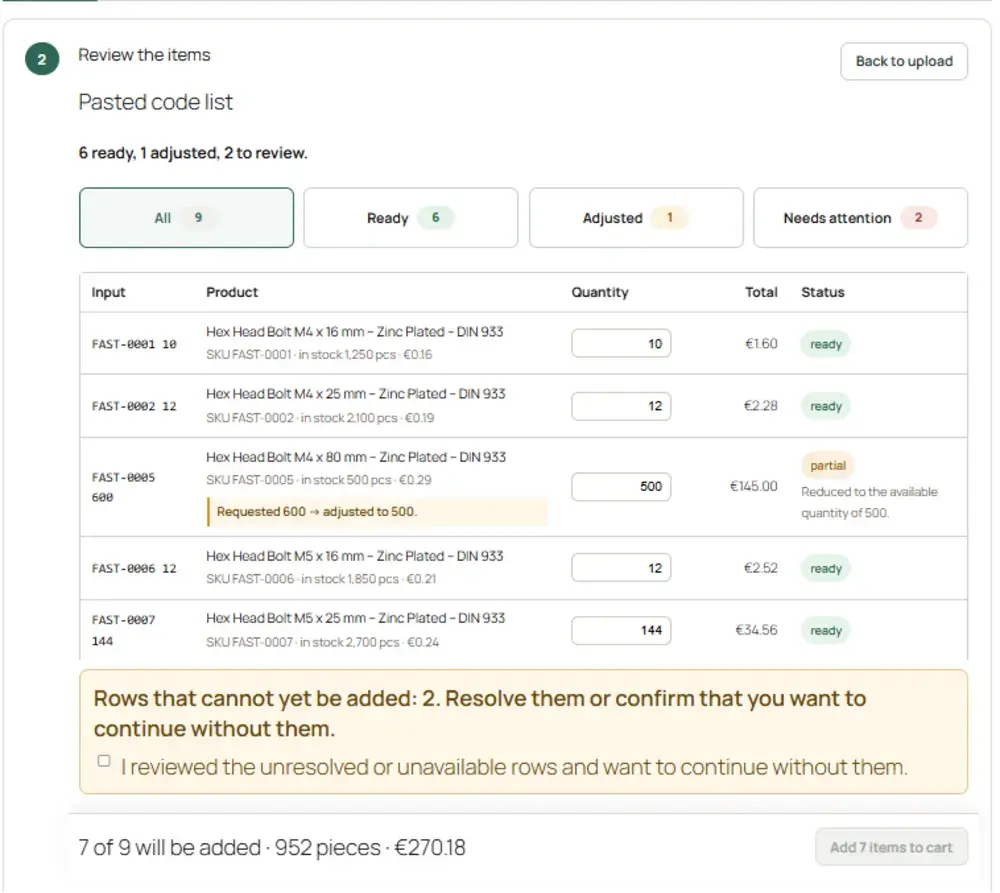
Actual customer interface, captured in a test store. Appearance may vary with version and theme.
Open full size ↗Let business customers order with their own product codes, save their regular lists, and work through company accounts.
Map customer-specific product codes to your catalog so their familiar references find the right items.
Start with importing and order checks in Free.
Choose Pro for customer codes, saved orders and company accounts.
Everything you need to turn a product list into a reviewed cart.
The free workflow, connected to the way your customers work.
Both editions support up to 2,000 rows per import. Pro adds customer codes, company accounts, saved orders and catalog templates.
Documentation & support
No. B2B Import helps customers build their order. Products go into the WooCommerce cart, and the purchase continues through your existing checkout.
XLSX, CSV, TSV and TXT files, or a list pasted as text. Customers can also enter products manually. Free supports SKU and EAN / GTIN matching; Pro adds customer-specific product codes.
The review step surfaces issues such as unmatched codes, stock availability and quantity rules. Customers can review and resolve exceptions before adding products to the cart.
Yes. Free includes importing, matching and core order checks. Pro adds customer codes, company accounts, saved orders and catalog template generation when you need them.
The demo is a simplified illustration using six sample products. It shows the idea behind matching and review without connecting to a store. Install the free plugin to try the actual interface with your own catalog.
Start with the installation instructions on WordPress.org. For plugin questions, use the support forum. The changelog lists published updates.
Both Free and Pro support up to 2,000 rows per import. Choose Pro for customer-specific product codes, company accounts, saved orders and catalog templates.
Grosik B2B Order Import is available now. These additional tools are being explored separately.
Product lead times and backlog visibility.
More control over supplier stock and price feeds.